Securing Windows Access: How Boundary and Vault Eliminate Static Credentials and Overly Broad Network Permissions
Organizations with Windows environments often struggle with two critical security issues: the persistence of static credentials and the overly broad access granted by traditional VPNs. These problems leave systems vulnerable to lateral movement and credential theft. In this Q&A, we explore how combining HashiCorp Boundary with Vault can transform your access and credential management—moving from network-based to identity-based controls, and dynamically rotating secrets to minimize exposure. Learn the key challenges and the modern solution that addresses both.
Why are static credentials still a widespread problem in Windows environments?
Static credentials persist because many organizations rely on shared local administrator accounts, long-lived domain accounts, service accounts with fixed passwords, or manually provisioned privileged credentials. Without automated rotation, these passwords can remain valid for months or even years, greatly increasing the risk of exposure if they fall into the wrong hands. Even with multi-factor authentication (MFA) at login, the underlying credential model remains static and often reused across sessions. In Windows environments, shared administrative accounts are common for RDP access, troubleshooting, and emergency break-glass scenarios, which further amplifies the risk. This should be a major concern for CISO, DevOps, and security teams, as a single compromised static credential can lead to extensive lateral movement and data breaches.
What is the lateral movement risk with traditional VPNs?
Traditional VPNs follow a perimeter-based security model—once a user is authenticated to the network, they often have broad access that is difficult to restrict. Limiting lateral movement typically relies on firewalls, security groups, and network segmentation, which control access based on IP addresses rather than the user’s unique identity. This approach is brittle, especially in dynamic environments where IP addresses change frequently. VPNs solve connectivity but don't enforce fine-grained, identity-based access to specific resources. As a result, an attacker who gains VPN access can move laterally across the network, exploiting overly permissive rules. This operational sprawl and management complexity add to the challenge, leaving organizations with a false sense of security while exposing critical Windows servers and workstations.
How does Boundary change the access model for Windows machines?
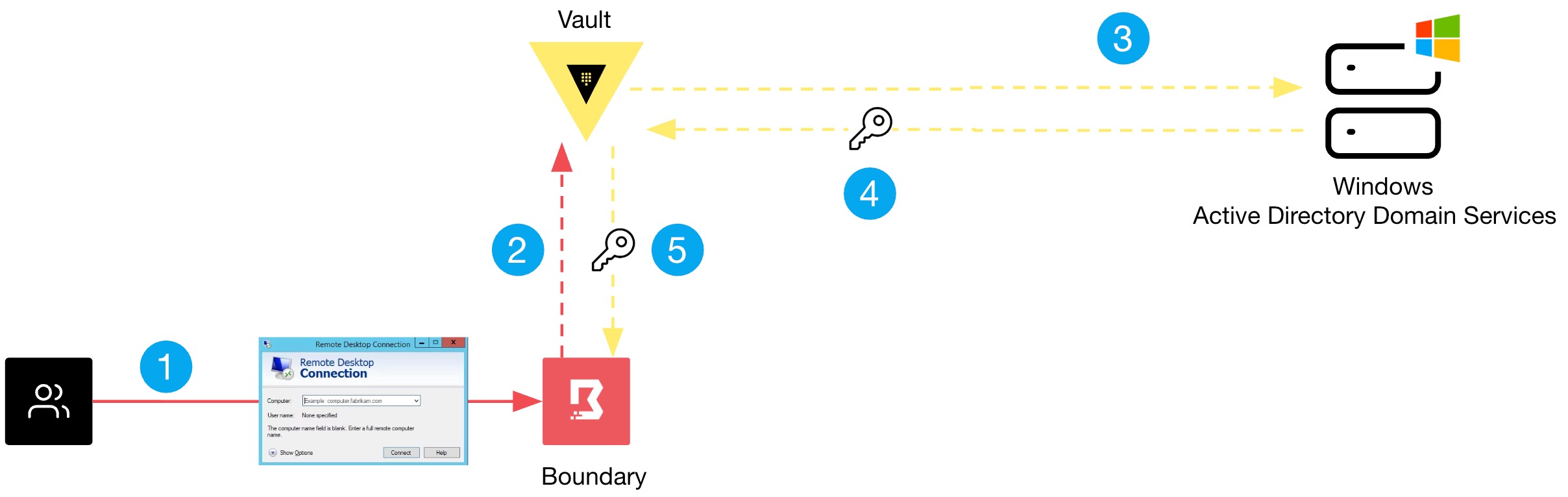
HashiCorp Boundary fundamentally shifts from granting broad network access to providing direct, identity-based access between a user and a target resource. Instead of placing the user inside the network, Boundary brokers a session to a specific Windows server or workstation based on the user's authenticated identity and assigned roles. This eliminates the need for a full VPN connection and drastically reduces the attack surface for lateral movement. Access is ephemeral and authorized per session, using short-lived credentials managed by Vault. This means even if a session is compromised, the attacker cannot pivot to other resources because they have no network-level access. Boundary acts as a centralized authorization plane, combining authentication and authorization into a single, auditable platform.
How does Vault handle credentials for Windows targets?
Vault integrates with Boundary to manage credentials dynamically. Instead of users knowing or storing static passwords, Vault generates short-lived, unique credentials for each session. For Windows targets, Vault can rotate local administrator passwords, create domain-account session tokens, or use SSH-based authentication. Boundary retrieves these credentials from Vault at the moment of connection and injects them into the session—without the user ever seeing the password. This eliminates the risk of credential disclosure and reuse. The credentials are automatically revoked or rotated after the session ends, ensuring that no long-lived passwords remain in scripts, configuration files, or memory. This model drastically reduces the exposure window and aligns with zero-trust principles.
What are the key steps to configure Boundary with Vault for Windows access?
While full configuration details depend on your environment, the general workflow starts with setting up Vault as a secrets engine that can manage Windows credentials. Next, you configure Boundary to use Vault as its credential store. Create user and group roles in Boundary that map to specific Windows resources (e.g., a specific server or RDP endpoint). Then define authorization policies that grant access only to those resources. For the Windows target, install the Boundary worker and configure it to reach the machine via RDP or WinRM. When a user requests access, Boundary authenticates via its own identity provider (or external IdP), checks authorization, retrieves a temporary credential from Vault, and proxies a secure session. Audit logs capture every connection for compliance. Testing this setup in a lab can reveal how drastically it reduces credential exposure.
Can Boundary and Vault be used together without replacing existing IAM tools?
Yes. Boundary and Vault are designed to integrate with existing identity management systems rather than replace them. You can connect Boundary to an external Identity Provider (IdP) such as Active Directory, Okta, or GitHub for authentication. Vault can also leverage existing LDAP or SAML providers. This means organizations can keep their current MFA, SSO, and identity lifecycle processes while adding a modern credential management and fine-grained access control layer. The result is a defense-in-depth approach: your existing tools verify identity, while Boundary controls which specific Windows resources a user can reach, and Vault dynamically handles the underlying secrets. There is no need to rip and replace; instead, this solution augments your security stack without adding operational complexity.
How does this approach improve auditability and compliance?
Every session through Boundary is recorded with detailed metadata: who accessed which resource, when, for how long, and what credential was used. The credential itself is never visible to the user, so there's no risk of it being stored or shared. Vault has its own audit logs for secret retrieval and rotation. Together, they provide a complete, tamper-evident trail of all privileged access to Windows environments. This is invaluable for compliance frameworks such as SOC 2, PCI DSS, and HIPAA, which require strict access controls and auditing of privileged actions. Additionally, because credentials are short-lived and rotated after each session, the risk of credential misuse is minimized. Organizations can easily generate reports to demonstrate least-privilege access and periodic access reviews, significantly reducing audit fatigue.
What are the practical benefits for day-to-day operations?
IT and DevOps teams no longer need to manage shared passwords or rotate static credentials manually. Remote access to Windows servers becomes as simple as clicking a button in Boundary's UI or using a CLI command—no VPN or RDP client configuration is needed. Emergency break-glass access can be granted via just-in-time privileges that expire automatically. The reduction in credential handling also lowers the helpdesk burden for password resets. Because access is identity-based and resource-specific, troubleshooting and patching can be performed without giving users unnecessary network access. The net result is a more efficient, secure operation where users get exactly the access they need—and nothing more—while security teams maintain full visibility and control.