10 Key Insights into the Python Environments Extension for VS Code
The Python development landscape has long been fragmented across environment managers like venv, conda, pyenv, poetry, and pipenv. With the new Python Environments Extension for VS Code, Microsoft brings a unified, streamlined workflow that simplifies managing environments, interpreters, and packages. After a year in preview and extensive community feedback, the extension is now rolling out for general availability. Here are ten essential things you need to know to leverage this powerful tool in your daily Python work.
1. A Unified Environment Experience
The core promise of the extension is consistency. Instead of switching between multiple CLI tools and UIs, you now have a single interface to handle environments from all major managers—venv, conda, pyenv, poetry, pipenv, and system Python installs. Whether you're a data scientist using conda or a web developer with pipenv, you can create, delete, switch, and manage environments without leaving VS Code. The extension works seamlessly with the existing Python extension and requires zero setup—just open a Python file, and environments are automatically discovered. This unification reduces cognitive load and streamlines daily workflows, especially in projects that span multiple environment types.
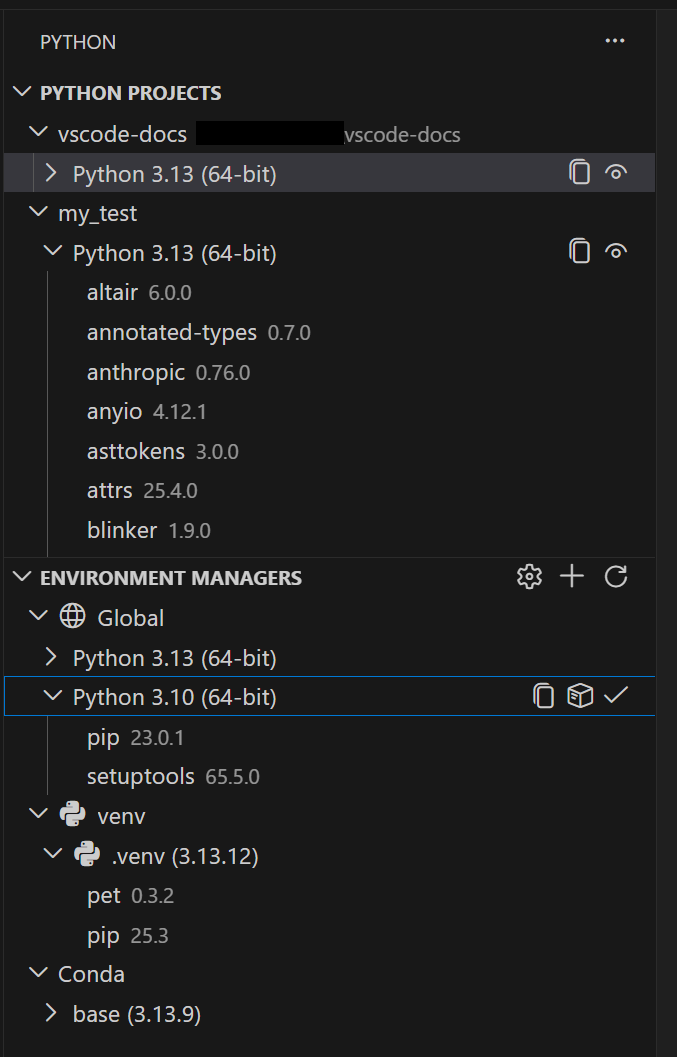
2. Automatic Environment Discovery
No more hunting for where your environments live. The extension automatically scans your system to discover all available Python environments. It checks your PATH, known installation locations, and any configured search paths. The discovery engine, built on the proven PET (Python Environment Tool) scanner, is written in Rust for speed and reliability across platforms. This means you get a comprehensive list of environments instantly, from the standard venv in your project folder to global conda environments and anything in between. The result is a transparent view of your Python ecosystem, helping you choose the right environment for each task.
3. Powered by the PET Rust Scanner
Behind the scenes, the extension uses the PET (Python Environment Tool) scanner—a fast, Rust-based engine that now comes with a dedicated UI. PET already powers environment discovery in the standard Python extension, so you're getting the same battle-tested technology. What's new is the user interface: a clean, interactive view that shows all discovered environments, their status, and provides actions like activation or deletion. The Rust implementation ensures near-instant scanning, even on large systems with many environments. For developers working on multiple projects with diverse setups, this speed translates to less waiting and more coding.
4. Faster Environment Creation with uv
If you have uv installed on your system, the extension will use it automatically to create venv environments and install packages. This integration is enabled by default via the setting python-envs.alwaysUseUv. Why care? uv is known for being significantly faster than standard tools like venv or pip, especially in large projects with many dependencies. A typical environment creation that might take seconds with standard tools completes nearly instantly with uv. This speed boost applies both to environment creation and to installing dependencies from files like requirements.txt or pyproject.toml. It's a free performance upgrade for anyone with uv installed.
5. Quick Create: One-Click Environments
Getting a new environment up and running has never been easier. The Quick Create feature, accessible via the + button in the Environment Managers view, builds an environment using your default manager and the latest Python version. It also automatically installs any workspace dependencies it finds in requirements.txt or pyproject.toml. In seconds, you have a working environment tailored to your project. This is ideal for rapid prototyping or when you just need a clean environment fast. No command-line invocations or wizard steps—just a single click and you're ready to code.
6. Custom Create for Full Control
When you need more than the defaults, the Custom Create feature (available via Python: Create Environment in the Command Palette) gives you granular control. You can choose your environment manager (e.g., venv or conda), specify a particular Python version, set a custom environment name, and select which dependency files to install from. For managers like pyenv, poetry, and pipenv, the extension does not create environments directly but discovers those you create with their CLI tools. This flexibility ensures you're not locked into a single workflow. Experienced developers appreciate the ability to precisely configure each environment while staying within the VS Code interface.

7. Python Projects: Environments Tied to Code Structure
One of the standout features is Python Projects, which lets you map environments to specific folders or files. This solves a common pain point in monorepos or multi-project workspaces where you need different environments for different parts of the codebase. Instead of manually switching environments as you move between modules, the extension can automatically activate the correct environment based on your current file or folder. This mapping is configurable and supports glob patterns, making it easy to handle complex project structures. Python Projects brings clarity and eliminates accidental cross-contamination between environments.
8. Configuration for Non-Standard Locations
While the extension works out of the box for most setups, it also lets you configure workspace-level search paths with glob patterns for environments stored in non-standard locations. You can also set global search paths for shared directories outside your workspace—perfect for team-shared environment drives or cloud-mounted folders. This ensures that no environment is left undiscovered, regardless of where it lives. The settings are intuitive and documented, so even beginners can extend discovery to custom locations. This flexibility makes the extension robust for enterprise environments with strict folder structures.
9. Gradual Rollout and Opt-In
The extension is being rolled out to all users gradually over the next few weeks. During this transition, your existing environment workflows will automatically switch to the new extensions interface—you don't need to do anything. However, if you're eager to try it immediately, you can opt in by setting python.useEnvsExtension to true in your VS Code settings. This phased approach ensures a smooth transition, with community feedback already baked into the final design. Once enabled, you'll notice no loss of functionality; instead, you gain a more cohesive environment management experience.
10. Getting Started and Future Potential
To start using the extension, simply update your VS Code and Python extension to the latest versions. There's no separate installation required—the Python Environments Extension comes bundled with the Python extension. Open any Python file, and within moments you'll see all your environments listed in the new dedicated view. As for the future, this unified approach paves the way for even deeper integration with other VS Code features like debugging, testing, and linting. The foundation is set for a more intelligent, context-aware Python development experience.
In conclusion, the Python Environments Extension transforms environment management from a fragmented chore into a streamlined, integrated part of your VS Code workflow. Whether you're a solo developer or part of a large team, the tools described above—unified UI, automatic discovery, Rust-powered speed, uv integration, one-click creation, and Python Projects—reduce friction and let you focus on writing code. Embrace the simplicity, and let your environments work for you.