Securing Encrypted Backups: A Step-by-Step Guide to Meta's HSM-Based Key Vault
Introduction
End-to-end encrypted backups protect users' message history from unauthorized access, even by service providers. Meta's approach leverages a distributed fleet of hardware security modules (HSMs) to store recovery codes, ensuring that neither Meta nor cloud storage providers can decrypt backups. This guide walks through the steps Meta uses to implement and strengthen this system, including recent updates for over-the-air fleet key distribution and transparent fleet deployment. Following these steps will help you understand and potentially replicate a similar architecture for your own applications.
What You Need
- Hardware Security Modules (HSMs): Tamper-resistant devices for securely storing cryptographic keys and recovery codes.
- Multi-datacenter infrastructure: At least three geographically distributed datacenters to support majority-consensus replication.
- Recovery code mechanism: A system for users to generate and manage recovery codes for backup decryption.
- Passkey support: Optional integration for passwordless authentication to simplify backup encryption.
- Fleet key distribution mechanism: A method for securely distributing HSM fleet public keys to clients, such as over-the-air (OTA) delivery.
- Cloudflare integration: To provide independent signing and audit logs of validation bundles.
- Whitepaper: Meta's technical specification, "Security of End-To-End Encrypted Backups", for detailed protocol verification.
Step-by-Step Process
Step 1: Establish an HSM-Based Backup Key Vault
Deploy a fleet of HSMs across multiple datacenters in different geographic regions. Each HSM must be tamper-resistant and configured to store recovery codes in a way that prevents extraction by any third party, including Meta. Use a majority-consensus replication scheme to ensure resilience: even if one datacenter fails, the vault remains accessible. The HSMs should be grouped into a logical "Fleet" with a unique public key that clients can trust.
Step 2: Implement Recovery Code Protection
Enable users to generate a recovery code — typically a random string or phrase — that is stored exclusively inside the HSMs. This code must be the only way to decrypt the backed-up message history. Ensure that the recovery code is never transmitted to Meta or cloud storage providers; it remains encrypted and sealed within the HSM fleet. The vault should provide a way for users to retrieve or regenerate the code if needed, using secure session establishment.
Step 3: Introduce Passkey-Based Encryption (Optional but Recommended)
Add support for passkeys — cryptographic credentials stored on the user's device — as an alternative to password-based recovery codes. Passkeys simplify the backup encryption process and enhance security because they are protected by device biometrics or PIN. This step involves integrating passkey APIs into the client application and ensuring the HSM fleet can verify passkey authentication without learning the passkey itself.
Step 4: Implement Over-the-Air Fleet Key Distribution for Messenger
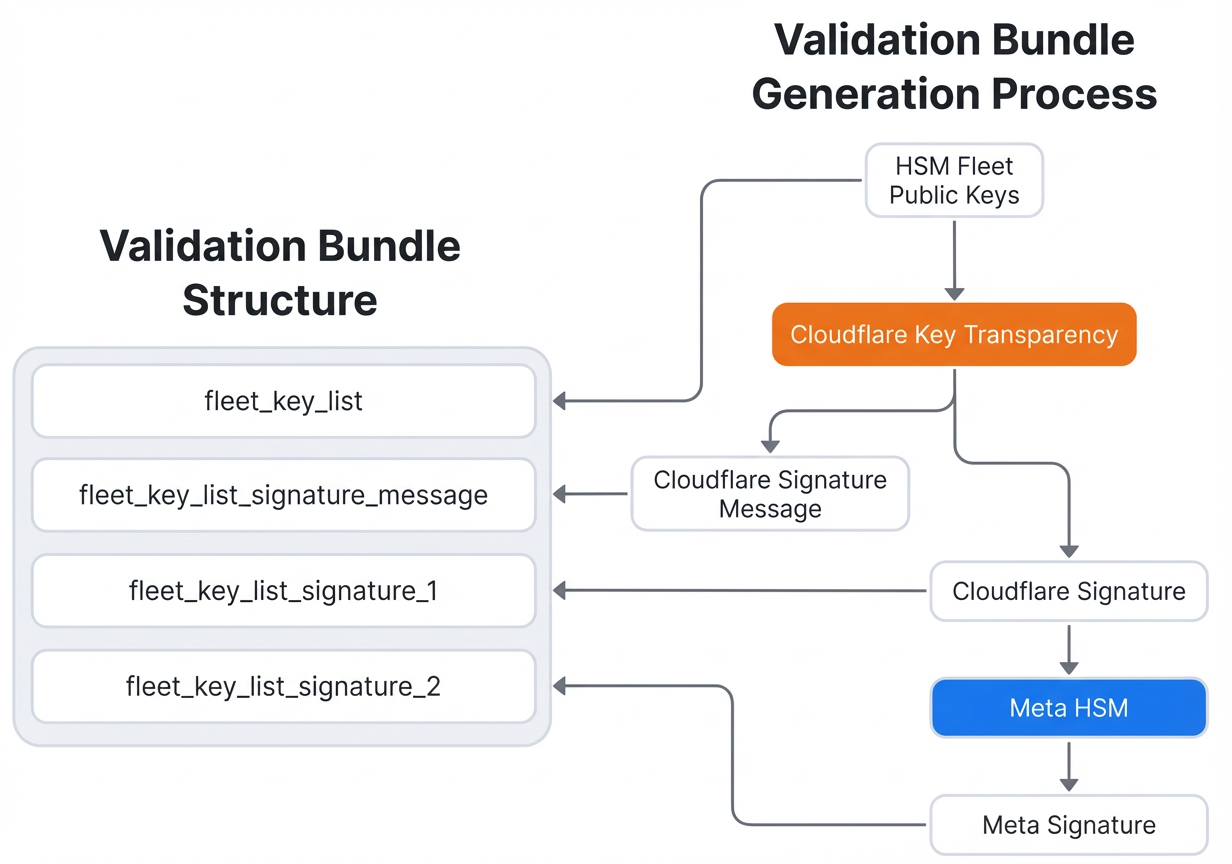
For platforms like Messenger where app updates are not feasible for every fleet change, distribute HSM fleet public keys over the air. During each HSM response, include a validation bundle containing the fleet public key, signed by Cloudflare and counter-signed by Meta. Cloudflare also maintains an audit log of every bundle, providing independent cryptographic proof of authenticity. The client verifies these signatures before establishing a secure session with the HSM fleet. Full details of the validation protocol are in the whitepaper.
Step 5: Publish Evidence of Secure Fleet Deployment
Commit to transparency by publishing on a public blog (e.g., Engineering at Meta) the evidence that each new HSM fleet is deployed securely. This evidence includes cryptographic proofs, configurations, and audit steps that any user can independently verify. New deployments are infrequent — typically every few years — but each must be thoroughly documented. Users can follow the verification steps in the whitepaper to confirm that Meta cannot access encrypted backups.
Step 6: Enable User Verification of Fleet Deployments
Provide a clear, standardized process for users to verify fleet trustworthiness. This involves downloading the evidence files from the blog, checking signatures against Cloudflare's audit log, and running the verification procedures described in the Audit section of the whitepaper. By making verification accessible, Meta ensures that the system remains transparent and trustworthy.
Tips for Success
- Test fleet rotation thoroughly — ensure that key distribution works without interrupting existing backup sessions.
- Use hardware-backed security for all sensitive operations; avoid software-only key storage.
- Monitor Cloudflare's audit logs regularly to detect any unauthorized validation bundle signing.
- Plan for geographic diversity in datacenter selection to withstand regional outages.
- Keep the whitepaper updated as the protocol evolves; transparency builds user trust.
- Consider passkey adoption as a user-friendly alternative to recovery codes — it reduces friction and improves security.
Conclusion
Meta's HSM-based Backup Key Vault sets a high standard for end-to-end encrypted backups. By following the steps above — from deploying tamper-resistant HSMs to implementing over-the-air key distribution and transparent deployment evidence — you can create a similarly robust system. The combination of cryptographic rigor, distributed resilience, and independent verification ensures that user data remains private and secure. For the complete technical specification, refer to the official whitepaper.